
Pinterest Video Downloader- KlickPin
The website is mainly dedicated to downloading Pinterest videos, images, and GIFs online for free (without watermark).
 How To Download Pinterest Videos using KlickPin?
What KlickPin does
KlickPin processes publicly accessible Pinterest links and shows the media made available for that link. Depending on the source, results may include videos, images, GIFs, stories, carousels, or available items from supported boards and profiles. You do not need to provide Pinterest login credentials.
The steps below explain how to download available Pinterest videos, images, and GIFs from the mobile app or a desktop browser.
Steps to Download from Mobile App:
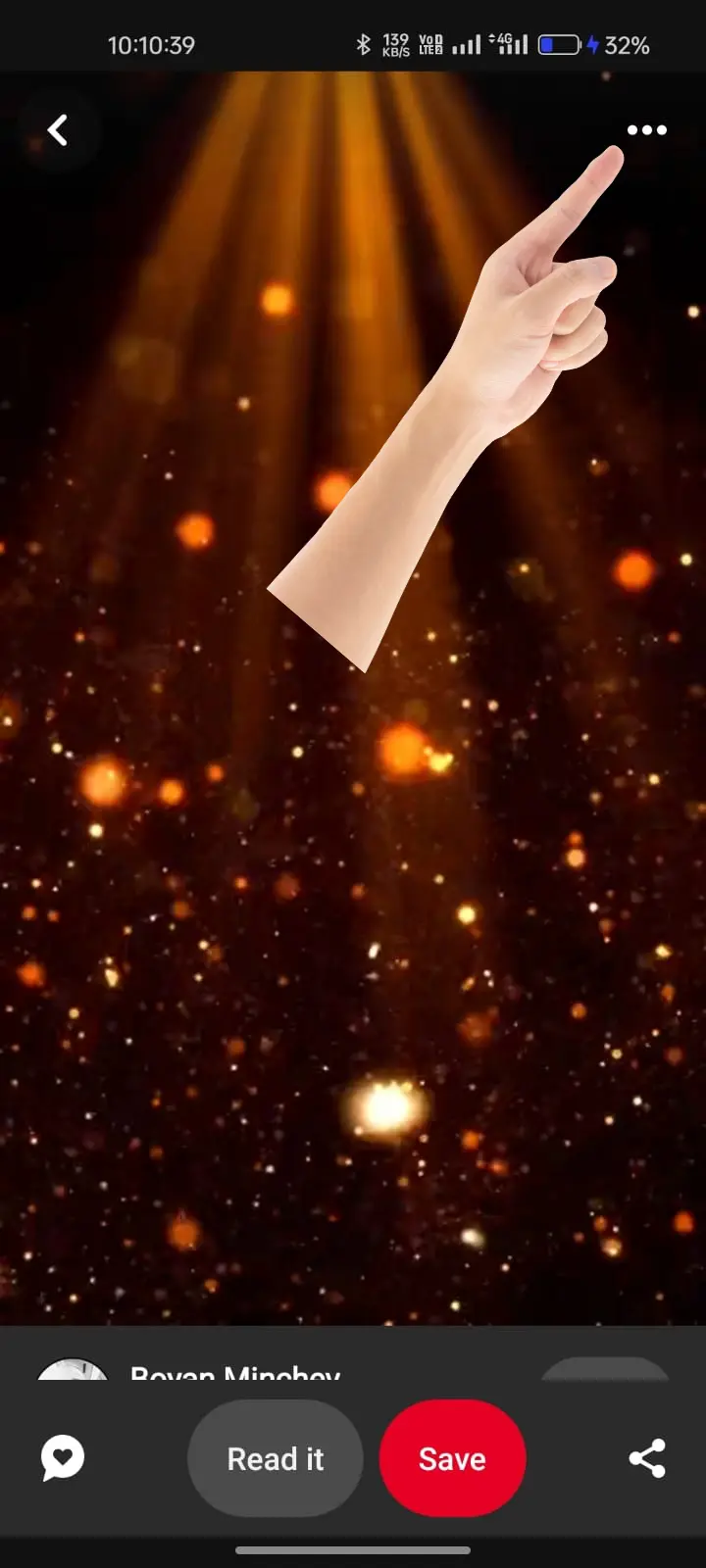
- Open the Pinterest App and select the video, image, or GIF you want to download.
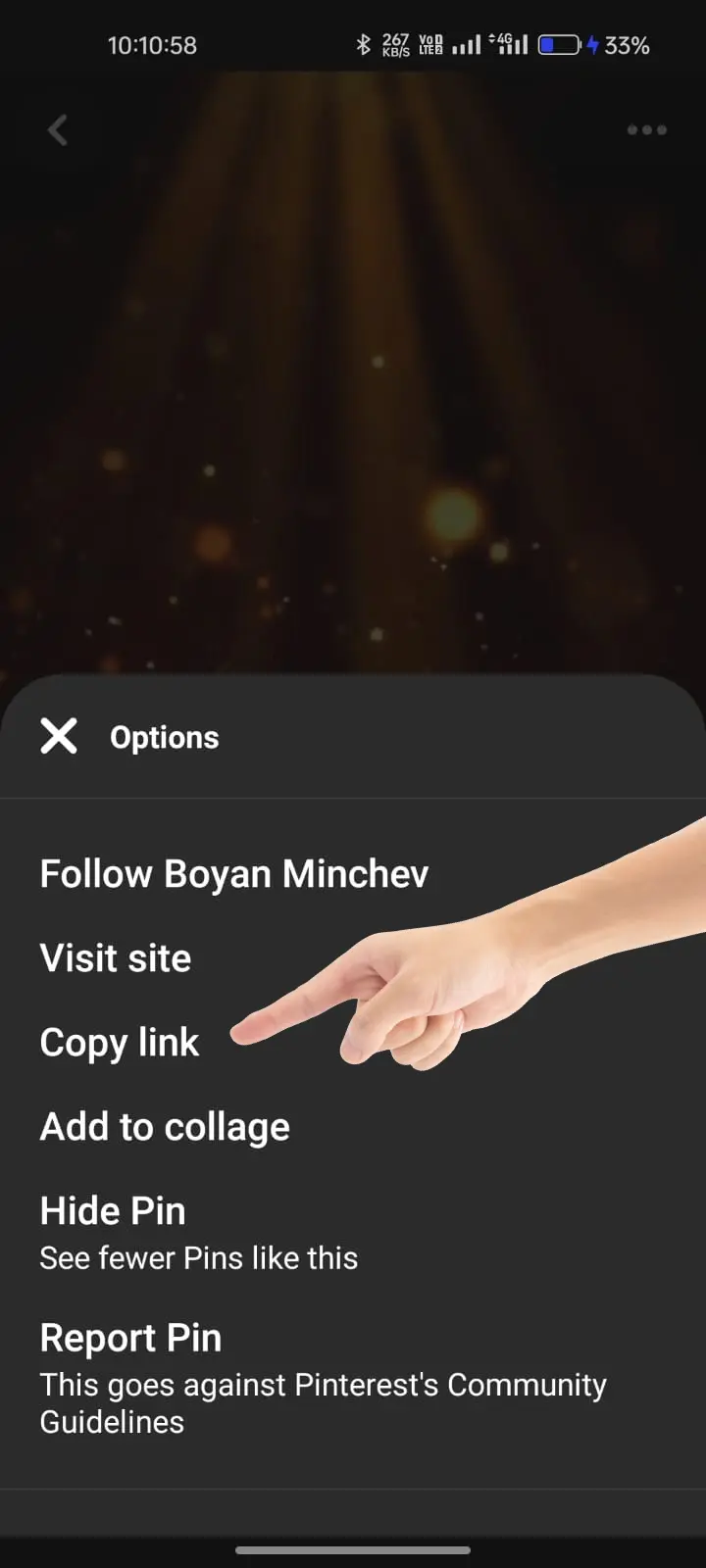
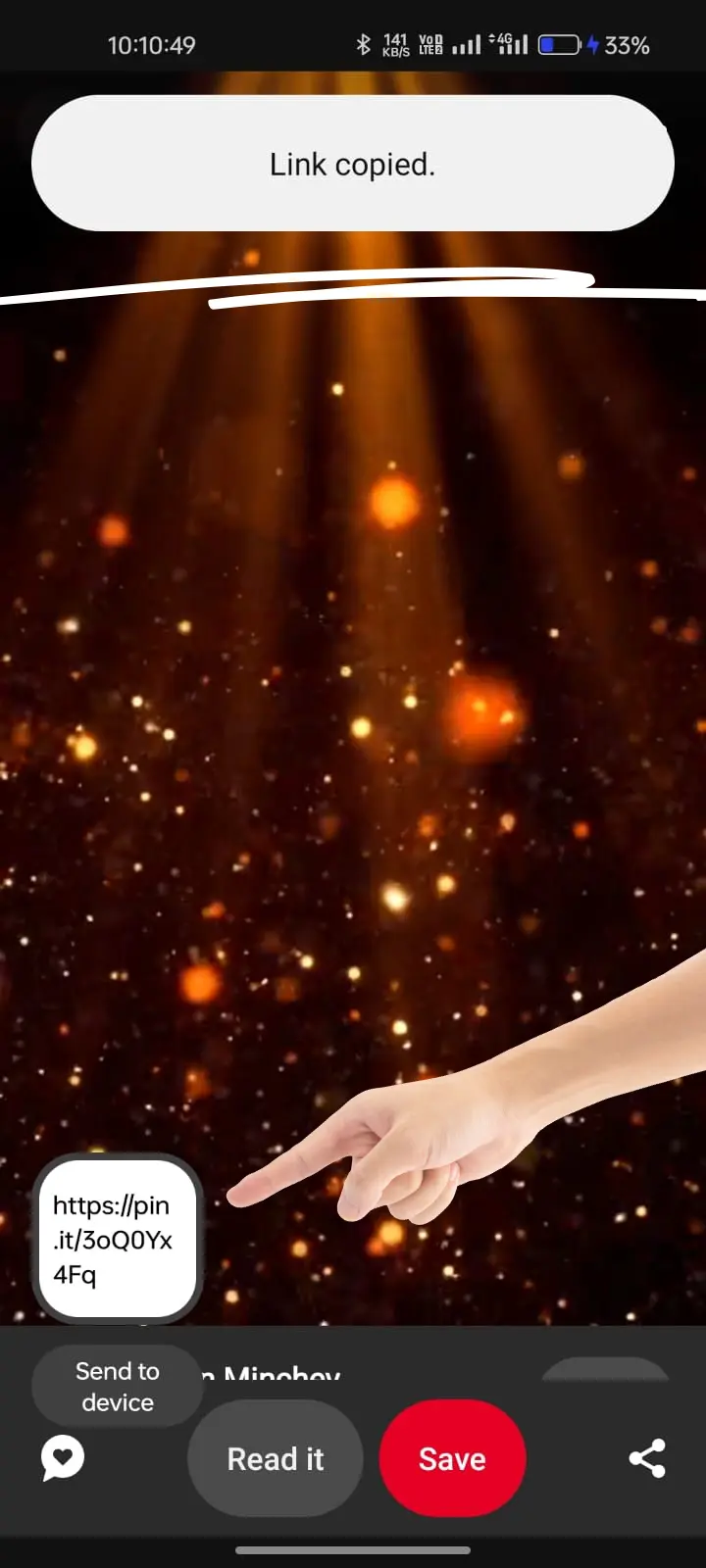
- Tap on the ••• icon at the top right corner of the Pinterest app. If you are using the latest version, tap on the ••• icon at the bottom right corner of the app. After tapping the ••• icon, tap on the Copy Link option.
- Paste the video URL in the Download Input Box on the KlickPin website, and tap on the Download button.
- You will see a preview of your download file. Tap on the Download button just below it.
- The Pinterest video, image, or GIF will be downloaded to your device.
Steps to Download from Desktop:
- Open the Pinterest website on your browser and select the video, image, or GIF you want to download.
- Copy the Pinterest video URL from the browser.
- Paste the URL in the box and press download.
- The video will be available for download.
- Drag the video file from the Downloads folder on your computer to your desired location.
What works / what does not
| What works | What does not work |
|---|---|
|
|
Quality note: KlickPin supports HD, 2K, and 4K when Pinterest provides those source files. It returns the available source quality as provided, does not manufacture or upscale media, and results can differ between Pins.
Does KlickPin Work on Mobile?
KlickPin is designed to work in modern mobile and desktop browsers, including:
- Android users (you can even install the APK)
- iOS/iPhone users - including saving to camera roll
- Desktop users (great for those who edit or manage content)
Whether you're searching for a Pinterest video downloader app, a Chrome extension, or just a fast website - KlickPin works from any browser.
What Else Can You Download?
Aside from standard Pinterest videos, KlickPin also helps you download:
- Pinterest reels and short videos
- Pinterest images
- GIFs posted as animated pins
- Stories and Idea Pins (multi-step tutorials or slideshows)
- Pinterest carousels with multiple images or videos
- Pinterest Ideas pages with images and videos from topic collections
- Pinterest Answers pages with images and videos from answer collections
- Pinterest profiles and Pinterest boards
- Multiple pin share links from Pinterest
For Pinterest profiles and boards, KlickPin can collect up to 50 available pins per request. These pins may include videos, GIFs, images, stories, or carousels when available.
Is KlickPin Safe to Use?
KlickPin is designed to process public Pinterest URLs without asking for your Pinterest username or password. As with any online download service, use only URLs and media you are permitted to download, and keep your browser and device security up to date.
- KlickPin does not require Pinterest login credentials.
- It works through your browser; you do not need to give KlickPin access to your Pinterest account.
- Private and restricted content, including login-only, invitation, and deleted content, is not supported.
Responsible use and creator rights
Publicly accessible content is not automatically copyright-free or public domain. Download only content you own or are authorized or legally permitted to save. KlickPin does not grant permission to reuse, republish, or commercially exploit downloaded media. Pinterest states that people retain rights to the content they post and provides a process for copyright complaints. Read the Pinterest Terms of Service and Pinterest Copyright Policy. KlickPin is not affiliated with Pinterest.
Privacy and service data
To provide, secure, measure, and improve the service, KlickPin uses Google Analytics, Microsoft Clarity, Google advertising and consent services, and normal server logs. Depending on your consent and settings, these services may process page views, traffic sources, approximate location, IP address and security-request information, browser and device details, response status, ad interactions, and masked page-interaction data such as clicks, scrolling, and navigation. The Pinterest URL you submit is processed to generate results. It is not included in KlickPin's custom analytics event, and form inputs are masked in Clarity recordings. KlickPin also records aggregate download-result details such as media type, Pinterest URL category, item count, media-source category, and collection type. Read our Privacy Policy for more information.
Video Tutorial: How to Use Klickpin Pinterest Downloader?
 UPDATE (1 January 2024):
KlickPin.com is not responsible for media downloaded by users. KlickPin.com does not host any Pinterest videos, images, or GIFs on our servers. Use KlickPin only with publicly accessible Pinterest content that you own or are authorized or legally permitted to download. Kindly read our Terms of Service before using this service. By using our website, you have accepted the Terms & conditions.
Klickpin.com is in no way associated with pinterest.com. All media contents are delivered directly from the CDN servers, no files are hosted on klickpin.com!
Supported URLs:
- https://in.pinterest.com/pin/795377984215165340/
- https://pin.it/60m8aXr85
- https://in.pinterest.com/klickpin_official/
- https://in.pinterest.com/klickpin_official/klickpin/
- https://www.pinterest.com/ideas/space-wallpaper-4k-ultra-hd/926295399832/
- https://www.pinterest.com/answers/how-to-save-gifs-on-pinterest/894609280868/
What's New Here!!

Due to technical issues, the KlickPin homepage has moved to the new /en5 version. Please update your bookmarks.
KlickPin experienced a temporary service interruption from about 5:01 AM to 9:19 AM IST on 13 July 2026, lasting about 4 hours and 18 minutes. We restored the website and download service, then checked the main pages, language pages, and download process. All monitored services are now working normally. We apologize for the inconvenience.
Added the Pinterest Profile Downloader and Pinterest Board Downloader for supported public profile and board URLs. Added the Pinterest Answers Downloader, Pinterest Ideas Downloader, and Pinterest Multiple Pin Share Downloader using the same KlickPin download flow.
A temporary server outage affected KlickPin from about 01:04 UTC to 01:50 UTC on 6 July 2026. We took immediate recovery steps to bring the server back online and restore the download flow. We apologize for the inconvenience. Users are now free to use KlickPin normally.
Some native language pages, including Spanish, French, and Indonesian, were displaying the English version. This has now been fixed. KlickPin pages will now serve in their original native languages again.
KlickPin now supports Pinterest Ideas pages, including topic collection URLs. Ideas pages can now be downloaded as a collection, including available Pinterest images and videos from the page.
KlickPin now supports Pinterest profiles, boards, and multiple pin share links, making it easier to download full collections from one place. Download support has been expanded for Pinterest videos, images, GIFs, stories, and carousels. Faster download methods are now available for smoother downloads across mobile and desktop devices. KlickPin v2.0 includes high-speed optimization for low-speed 4G mobile users around the world.
Added the Pinterest Carousel Downloader to download supported Pinterest carousel images and videos. Added the Pinterest Story Downloader to download supported Pinterest story pins and idea pins.
Downloading WebP, GIF, ICO, CUR, TIF, SVG, and BMP format images from Pinterest has been fixed. Added a new Download button for Artwork while downloading GIF files. The landing page will display consecutive header tags for Images, Videos, and GIFs.
This update brings a new design refresh for a simpler and better experience overall as well as some minor fixes. We updated the home page and download page making them easier to use and mobile friendly, so that you can keep downloading videos on the go. We also fixed some issues and added some tweaks for a faster downloader. Last but not least, KlickPin is now secure with full HTTPS support. We have introduced a new feature allowing you to download Pinterest GIFs along with videos and images.
For the best experience, use the latest version of your web browser and ensure your internet connection is stable while downloading large files.

Please ensure that you have permission from the content owner before downloading any media from Pinterest using KlickPin.
KlickPin started providing services to download Pinterest videos, images, and GIFs online.
Questions & Answers !!
Can I download videos from Pinterest?
Yes, when the video is available through a publicly accessible Pinterest URL. Copy the URL, paste it in the form above, and click Download to see the available result.
How to download Pinterest videos?
- Copy the public Pinterest URL.
- Paste it into the KlickPin downloader and select Download.
- Choose an available result and save it with your browser.
How can I download images from Pinterest?
To download images from Pinterest, follow the same steps as for videos. Copy the image URL, paste it into the form, and click Download. The image will be saved to your device.
Can I download GIFs from Pinterest?
Yes, KlickPin supports downloading GIFs from Pinterest. Copy the GIF URL, paste it in the form above, and click the Download button to save the GIF to your device.
Where are files saved after being downloaded?
Downloaded files are typically saved in the "Downloads" folder on your device. You can check your browser's download history by pressing CTRL+J on your keyboard.
Frequently Asked Questions
Does the Pinterest URL need to be public?
Yes. KlickPin processes publicly accessible Pinterest URLs. Private, login-only, restricted, deleted, and unavailable content cannot be accessed.
Can I download Pinterest boards and profiles?
Yes. KlickPin supports publicly accessible Pinterest board and profile URLs and can collect up to 50 available Pins per request. A larger board or profile will not be downloaded in its entirety in one request.
Can KlickPin process private or invitation URLs?
No. Private, restricted, login-only, and Pinterest invitation or board-collaboration URLs are not supported. KlickPin does not bypass access controls or permissions.
What quality and formats are available?
KlickPin supports HD, 2K, and 4K when Pinterest provides those source files. It returns the available format and resolution as provided by the public Pinterest source, does not manufacture or upscale media, and results can differ between Pins.
Does KlickPin store downloaded files?
KlickPin does not maintain a permanent user-media library or ask users to upload files. A submitted public Pinterest URL is processed to locate available media, and delivery providers or network caches may temporarily handle responses. Normal technical, security, analytics, and aggregate result data is processed as described in the Privacy Policy.
Are KlickPin browser extensions available?
Yes. KlickPin browser extensions are available for Google Chrome, Mozilla Firefox, and Microsoft Edge.
What am I allowed to download and reuse?
Download only publicly accessible media that you own or are authorized or legally permitted to save. Public availability does not make content copyright-free or public domain, and KlickPin does not grant permission to reuse, republish, or commercially exploit downloaded media. See the Terms of Service.
Read the Privacy Policy and Terms of Service.